Featured
Introducing outbound calls with VoiceAI
What’s new: Phreesia VoiceAI now supports automated outbound patient calls for workflows such as care gap outreach and balance follow-ups. Patients receive a conversational call experience and can respond or take action during the interaction, without requiring live staff involvement.
How this helps you: Your staff spends hours each week on outbound calls that patients often ignore. VoiceAI handles that volume automatically and converts it into revenue. One organization collected $256K from 1,700 patients through automated outbound balance follow-ups, with zero staff involvement.
VoiceAI now accepts patient payments over the phone
What’s new: Phreesia VoiceAI can now collect patient payments directly within an automated call, with no-staff involvement required. When a patient calls your practice to pay a balance, VoiceAI verifies their identity, confirms the outstanding amount, and processes payment securely through Card on File or a one-time online payment link.
How this helps you: Patients pay when it’s easy. Phreesia VoiceAI now makes payment possible in the moment a patient calls, with no staff required. Phreesia customers collecting through self-service channels see up to 90% more collected within two months and recover balances 4x faster than manual billing. One organization saw 117% more collected from self-service payments within five months of adding digital channels.
Automated follow-ups for health campaigns
What’s new: Health Campaigns now supports automated follow-up outreach. When a patient does not respond to an initial campaign message within a configurable window of 1 to 30 days, follow-up messages can now be sent automatically.
How this helps you: Increase campaign engagement without creating additional manual outreach work for your staff. Automated follow-ups help organizations maintain patient engagement and improve response rates for important health initiatives.
Next step: This feature will be available to configure for organizations using Health Campaigns.
Early Access
eClinicalWorks organizations can now use VoiceAI to schedule new patients
What’s new: VoiceAI can now schedule appointments for new patients through a natural phone conversation experience for eClinicalWorks organizations. During a single call, VoiceAI collects information, creates the patient record and books the appointment automatically.
How this helps you: Reduce front desk burden and capture more new patient opportunities without increasing staff workload. Automating new patient scheduling helps minimize hold times, reduce abandoned calls and move patients into care faster.
Phreesia VoiceAI Updates
Time-based routing for Voice Navigation
What’s new: Voice Navigation now supports a Time-Based Routing mode for organizations using the same phone line for both daytime and after-hours calls. During business hours, calls route to VoiceAI. After hours, calls continue through the existing OnCall workflow, with non-urgent calls handled by VoiceAI.
How this helps you: Organizations can now use VoiceAI during the day and OnCall after hours on the same phone line, without maintaining separate numbers or workflows.
Improved call intent recognition for Phreesia VoiceAI
What’s new: Phreesia VoiceAI now recognizes a broader range of natural language phrases across all call categories, reducing the share of calls routed to “Other.” Calls referencing payment plans, insurance authorizations and lab results are more reliably matched to the correct category.
How this helps you: Reduce manual call routing and improve first-call resolution. More accurate intent recognition helps patients reach the right workflow faster while decreasing calls incorrectly routed to “Other.”
Updated Spanish voice for VoiceAI
What’s new: The Spanish text-to-speech voice in VoiceAI has been updated to use a neutral American Spanish accent, better aligned to the regional dialect most common among Spanish-speaking patient populations in U.S. organizations. This update is automatically applied to all organizations using Spanish for VoiceAI.
How this helps you: Spanish-speaking patients receive a more natural caller experience, with no configuration changes required from your organization.
Next step: This update is automatically applied for organizations using Spanish VoiceAI workflows.
OnCall
Redesigned patient info experience in the OnCall mobile app
What’s new: The OnCall mobile app now includes a redesigned experience across the Patient Info, Clinical, Rx and Documentation sections on both iOS and Android.
Updates include:
- Vitals displayed alongside demographics and appointment context
- Clear separation between clinical review and action workflows
- Improved refill request and prescription workflows
How this helps you: Providers managing patient calls can access and act on patient information faster, with fewer steps. A more consistent experience across Android and iOS also reduces confusion for organizations supporting multiple device types.
Next step: This feature will be available automatically upon updating to the latest version of the OnCall mobile app.
Streamlined message review in the OnCall mobile app
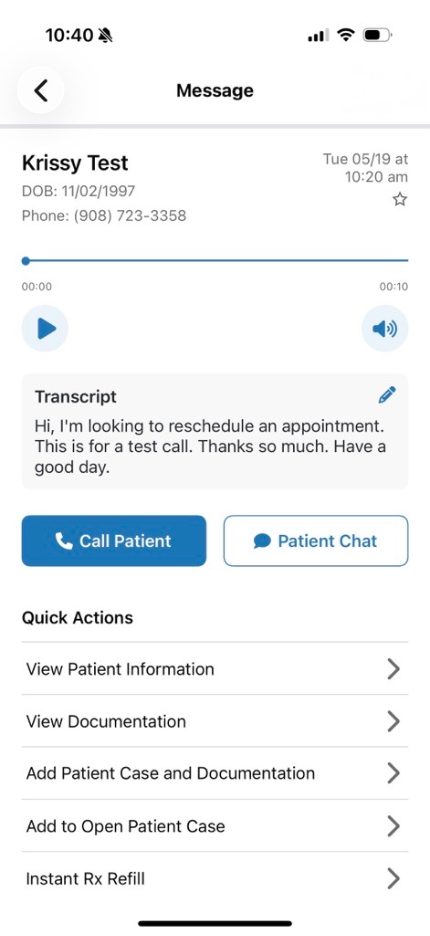
What’s new: Tapping a message in the inbox now takes providers directly to a single screen containing the audio recording, transcription and all available actions. Messages with audio or transcription content are marked as read automatically when opened; messages without audio or transcription are marked as read once an action is taken.
How this helps you: Providers can review message content and take action faster, helping reduce response times for patients waiting on callbacks or care decisions. Consolidating audio, transcription, callback and documentation workflows into one screen reduces navigation during after-hours workflows and high-volume periods.
Next step: This feature will be available automatically upon updating to the latest version of the OnCall mobile app.
Expanded message preview in the non-urgent inbox
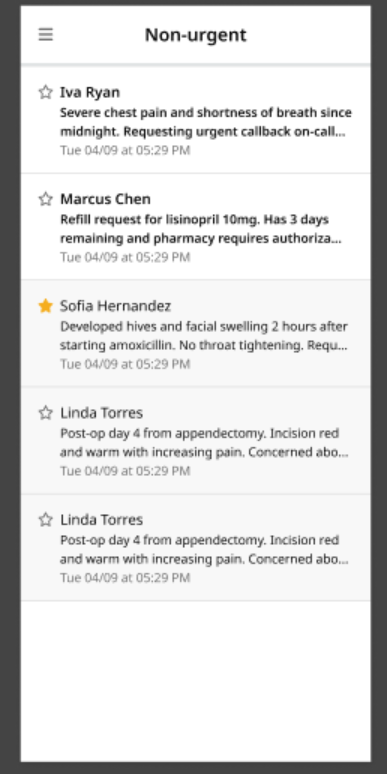
What’s new: The non-urgent section of the OnCall mobile app inbox now displays two lines of message preview text, matching the behavior already available in the primary inbox view.
How this helps you: Providers can understand why a patient called at a glance without opening each message individually. Faster triage across non-urgent queues helps teams prioritize responses more efficiently during busy periods.
OnCall EHR integration now available for AdvancedMD and Altera Touchworks
What’s new: Full EHR integration for OnCall is now generally available for AdvancedMD and Altera Touchworks organizations. Features include patient search and matching for incoming calls, patient information surfacing directly in the app and automatic export of call notes and transcriptions to the EHR.
How this helps you: Staff managing after-hours calls can quickly identify callers, access relevant chart information and automatically document conversations in the EHR. This reduces manual lookup and documentation work that can slow after-hours workflows.
Registration
Patients can now return to their Appointment Readiness link after completing intake
What’s new: Patients can now revisit their Appointment Readiness link after completing intake to review insurance details before their appointment. Updated eligibility and benefits information is retrieved when available.
How this helps you: Reduce front desk calls by allowing patients to review coverage details on their own before appointments.
Next step: This enhancement is automatically available for eligible Appointment Readiness workflows.
Close any appointment request from the status dropdown
What’s new: Appointments Hub now includes an optional setting that allows staff to close appointment requests directly from any status within the status dropdown.
How this helps you: Reduce administrative cleanup and keep appointment queues organized by closing stale requests and cancellations more quickly.
Next step: This feature is off by default and can be enabled within Appointments Hub Setup.
Security & Communication
Guidance for identifying phishing and impersonation attempts
What’s new: Phreesia is reminding organizations to remain vigilant against phishing emails and impersonation attempts that may use altered domains, suspicious links or requests for sensitive information.
How this helps you: Helping staff identify suspicious emails can reduce the risk of credential theft, payment fraud and unauthorized access to sensitive information.
Alt text now required for new images in email templates
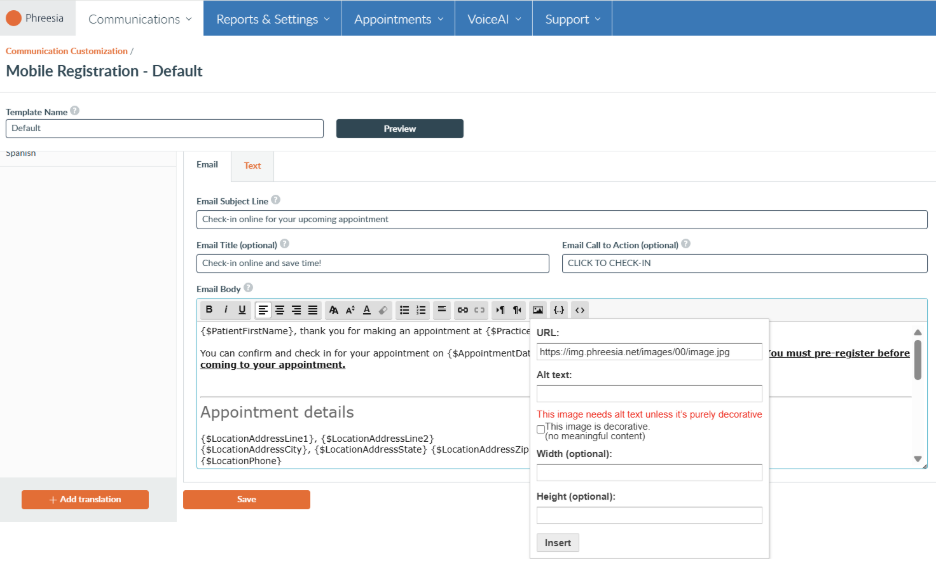
What’s new: The Communication Customization Template Editor now requires alt text when adding new images to email templates. When adding a new image in the Communication Customization Template Editor, you will now be prompted to enter alt text before saving.
How this helps you: Support patients who rely on screen readers and accessibility tools when reviewing appointment, billing and care communications, helping ensure outreach remains accessible to a broader patient population.
Next step: This enhancement is automatically enabled for organizations using customized email templates.
Phreesia Library
Phreesia offers a library of standardized tools(this link opens in new window) and best-practice content designed to align with industry recommendations and increase completion rates. These pre-built modules can be seamlessly added to your existing intake workflows. Organizations that use these modules see a 9.5% lower drop rate, and patients complete interviews 48.8% faster compared to custom content.
Standardized tools
We now offer the following clinically validated patient-reported outcomes (PROs).
Rapid Mood Screener (RMS)
A validated 6-item self-report screening tool that identifies symptoms associated with bipolar I disorder in patients presenting with depressive symptoms, using a Yes/No format to assess depressive history, antidepressant response, mood elevation, increased energy, racing thoughts and reduced need for sleep.
Fatigue Severity Scale (FSS)
A validated 9-item patient-reported outcome measure that assesses the severity of fatigue and its impact on daily functioning across motivation, physical activity, work and social life over the past week. Uses a 7-point response scale and includes a Visual Analogue Fatigue Scale (VAFS) for overall fatigue assessment.
Spence Children’s Anxiety Scale (SCAS) Child and Parent Report
A validated pediatric anxiety screening tool that assesses anxiety symptoms in children and adolescents from both child and caregiver perspectives. The Child Self-Report (approximately 44 items) and Parent Report (approximately 39 items) use a 4-point frequency scale to support structured behavioral health screening and longitudinal symptom monitoring.