
🚀 EARLY ACCESS
Automate bill approval for faster collections
What’s new: Eligible patient bills can now be automatically approved without manual review, allowing them to move directly to patient outreach.
How this helps you: Every day a bill sits in a queue is a day you’re not getting paid. By sending bills sooner, you accelerate collections and reduce time spent managing approvals. Phreesia clients already see up to an 85% success rate on scheduled payments; this helps you get to that outcome faster.
Collect balances with VoiceAI outbound payments
What’s new: Phreesia VoiceAI can now place outbound calls to patients with outstanding balances, guiding them through payment options like card on file or secure payment links while capturing call outcomes.
How this helps you: Gives you another way to reach patients who haven’t responded to reminders, helping you bring in more revenue without manual follow-up.
Interested in optimizing your payment collection?
Improve message capture with conversational VoiceAI
What’s new: Phreesia VoiceAI’s redesigned “Take a Message” experience allows patients to speak naturally without prompts or keypad actions, while VoiceAI automatically captures, transcribes and summarizes the interaction. Call recordings are also available, so patients don’t need to repeat information.
How this helps you: Eliminates the daily routine of logging into separate systems, pulling messages, and calling patients back. Messages are captured and organized automatically, reducing manual work and helping your team start the day without a backlog of calls to manage.
Simplify insurance updates with an enhanced E&B experience
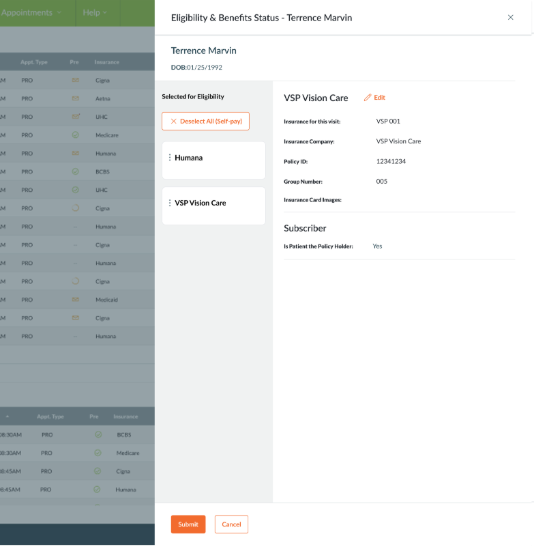
What’s new: The Eligibility & Benefits editing experience has been redesigned so staff can update insurance details within a single workflow, with tools like drag-and-drop plan ordering and one-click self-pay.
How this helps you: Accurate insurance information upfront prevents downstream issues. When coverage details are wrong or incomplete, claims get denied and payments are delayed. This makes it easier to get it right the first time.
🚀 FEATURED
Deliver faster, more accessible intake with the new PadX experience
What’s new: The redesigned PadX experience is now live for all clients, with a modern interface, improved accessibility, and expanded workflow support.
How this helps you: Makes it easier for patients to complete intake on their own, reducing reliance on staff and keeping workflows moving. In early access, organizations saw 25% shorter intake times and a 34% increase in daily payment transactions, helping speed up both registration and collections.
Next steps: This feature will be automatically enabled for clients using Phreesia PadX
Accelerate payments with Patient Bill Pay for athenahealth
What’s new: Patient Bill Pay is now available for athenahealth clients, with automated balance notifications and secure digital payment options.
How this helps you: Drives faster collections and reduces manual work while giving patients a simple, transparent way to pay.
Interested in optimizing your payment collections?
Fill schedules faster with smarter Appointment Accelerator outreach
What’s new: Appointment Accelerator now prioritizes waitlisted patients in Veradigm when selecting patients for outreach.
How this helps you: Reach higher-intent patients first, reduce gaps in your schedule, and better align outreach with patient demand.
Next steps: This feature will be automatically enabled for Veradigm clients using Appointment Accelerator
Reduce call volume with VoiceAI appointment cancellations
What’s new: VoiceAI can now fully automate appointment cancellations for eCW and Prime Suite, updating schedules in real time and sending SMS confirmations.
How this helps you: Free up staff from repetitive calls while giving patients fast, 24/7 support. This feature eliminates manual cancellation calls and keeps your schedule accurate without staff involvement.
Next step: This feature will be automatically enabled for eligible Prime Suite and eCW clients
Next Level: Every cancellation creates a gap in your schedule. By processing cancellations instantly, those slots become available sooner—giving Appointment Accelerator more time to backfill them and helping you keep schedules full.
Interested in learning more? LEARN HOW VOICEAI HANDLES CANCELLATIONS
Phreesia On Call
Ensure accurate provider data with NPI collection
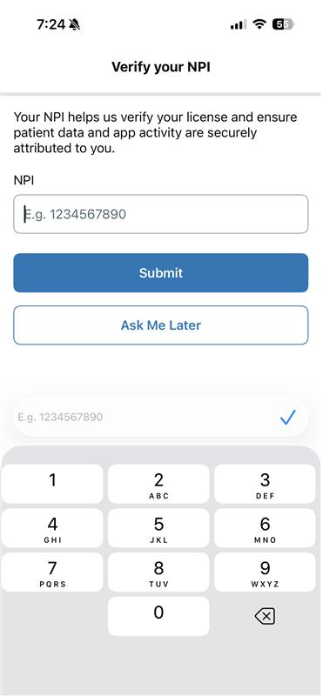
What’s new: Providers using the PhreesiaOnCall mobile app are prompted to enter their National Provider Identifier (NPI) if it’s missing, with reminders over time until completed.
How this helps you: Missing provider data creates downstream work—duplicate records, mismatches and manual corrections. Ensuring NPIs are captured upfront keeps records accurate and reduces the need for staff to fix issues later
Next step: This feature will be automatically enabled for providers using the PhreesiaOnCall application.
Eligibility & Benefits
View coverage details at a glance with the enhanced E&B overlay
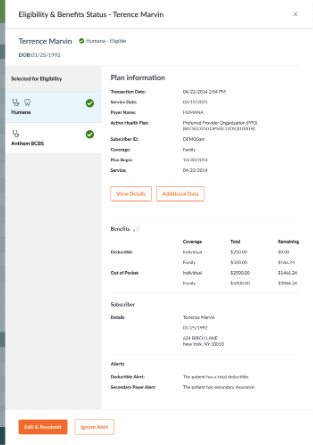
What’s new: The enhanced Eligibility & Benefits overlay is now generally available! Key insurance details like plan name, coverage type and eligibility status are now displayed in a single, tabbed view, making it easy to review multiple plans.
How this helps you: When staff have to click into each plan to understand coverage, check-in slows down and errors increase. This gives a clear view upfront so teams can quickly confirm eligibility and move forward with confidence.
Next step: This will be automatically enabled for clients currently using Phreesia Eligibility & Benefits.
Intake
Support more accessible intake with the new Accessibility Guide
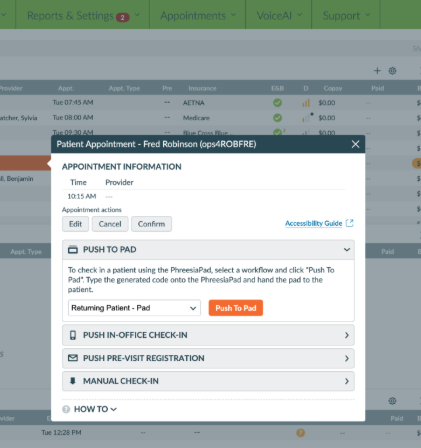
What’s new: A new dashboard-accessible guide provides step-by-step instructions for enabling accessibility features on mobile and PadX.
How this helps you: Gives staff a clear path when patients need assistance, reducing slowdowns during intake. Patients who rely on accessibility tools can complete registration more independently, improving both speed and experience.
Next step: This will be automatically enabled for clients and accessible via the Phreesia dashboard
Communication
Improve engagement with clearer email CTA buttons
What’s new: Email CTA buttons now include more descriptive link text.
How this helps you: Makes it easier for patients to understand and act on communications, improving engagement.
Next step: This will be automatically enabled for clients currently using Mobile Registration and Appointment Readiness.
Create more accessible announcements with image alt text
What’s new: You can now add alt text to images in Patient Announcement templates.
How this helps you: Improves accessibility for patients using screen readers and supports more inclusive communication.
Next step: This feature will be automatically enabled for all clients using Announcements
Payments
Improve accessibility across Online Payments
What’s new
Online Payments has been enhanced to provide a more accessible experience across the full payment journey. Updates include improvements to navigation, form completion, and overall usability, helping patients move more easily from payment entry through confirmation.
How this helps you
Patients of all abilities, including those who use assistive technologies such as screen readers or keyboard navigation, can complete payments more independently. This supports a more inclusive, consistent experience while helping reduce reliance on staff for payment assistance.
Next step
These accessibility improvements are automatically available to all clients using Online Payments.