
📣Featured Release: AutoPay for Bill Pay is here.
Automatically collect payments through Bill Pay from patients with cards on file and signed financial policies. Once a bill is approved in the Patient Billing Manager, AutoPay schedules the charge—no manual follow-up needed.
How this helps you
- Collect payments in as little as 1–7 days
- Boost collections by up to 15%
- Reduce reliance on paper statements
Ready to enable AutoPay for Bill Pay?
Don’t have Bill Pay yet? Add it now to unlock AutoPay. Get Started
Product Spotlight: Access eForms for Hospitals & Health Systems
Access eForms digitizes patient consent and signature collection across your hospital, eliminating paper packets and manual scanning. Staff can capture signatures wherever care is delivered, with forms remaining consistent, compliant, and stored directly in the host system.
Explore how Access eForms can streamline your documentation workflows and keep you audit-ready.
Payments
Collect payments faster with Push to Mobile Wallet
What’s new: Phreesia users can send patients a secure text message with a payment link, allowing them to quickly complete in-office payments using Apple Pay or Google Pay.
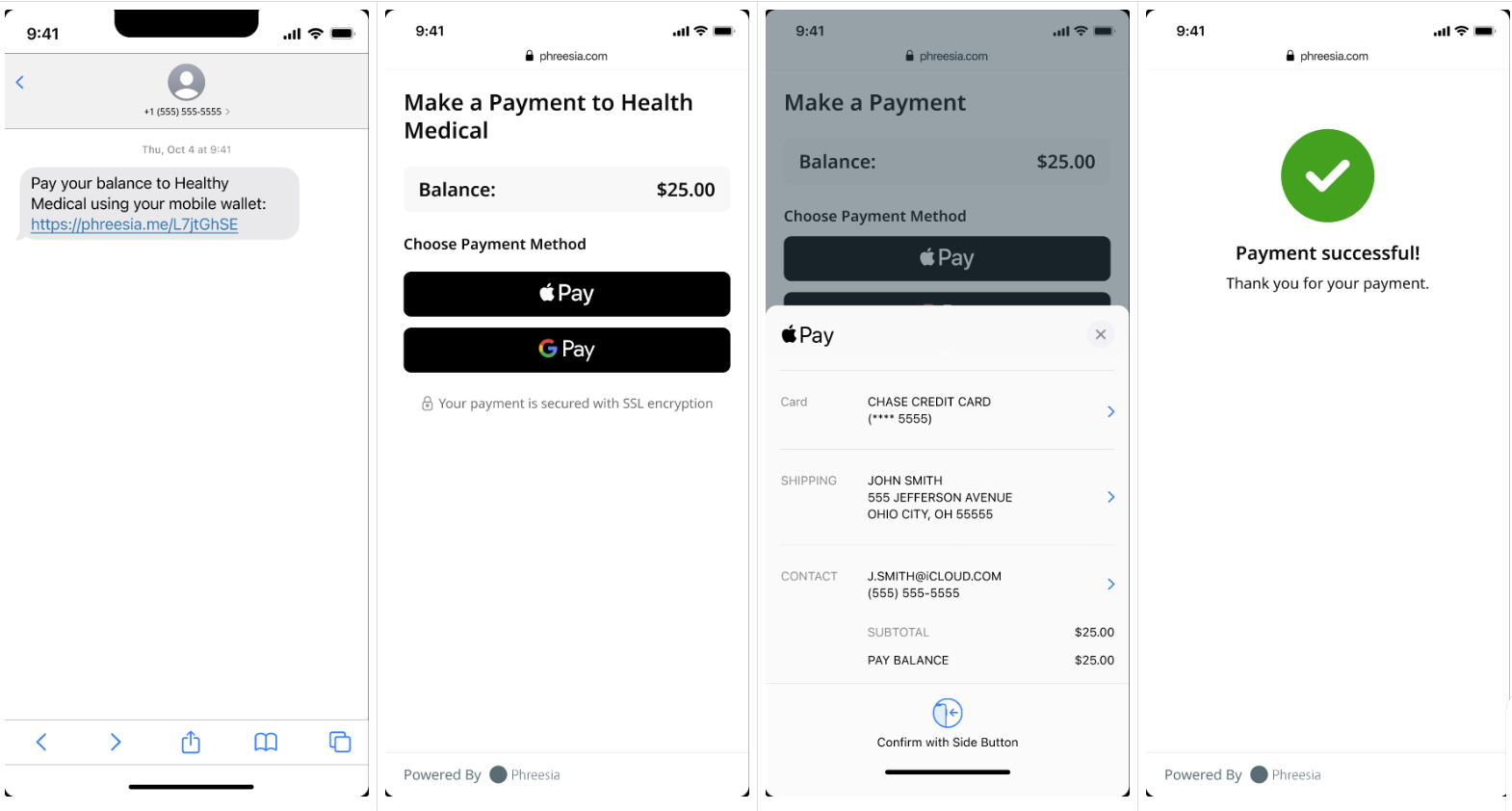
How this helps you: Push to Mobile wallet gives your patients a faster, more flexible payment option when they don’t have a card on hand or prefer using a mobile wallet—helping your staff collect payments more efficiently and improve the in-office payment experience.
Next steps: This feature will be automatically enabled mid-December for all clients processing payments through Phreesia. Not processing payments with Phreesia yet? Learn how to get started.
Communications
Update to patient messaging: notifications now send during open chats
What’s new: Non-conversational messages—like Push to Mobile Wallet or pre-visit instructions will be automatically be delivered, even when a patient has an open chat. This enhancement is available for all clients.
How this helps you: You’ll avoid missed messages and reduce manual follow-up—while keeping the patient’s chat experience smooth and uninterrupted.
Eligibility
Automatic Copay suppression when Out-of-Pocket maximum is met
What’s new: Phreesia now automatically suppresses copays when a patient has reached their out-of-pocket (OOP) maximum—no manual review required.
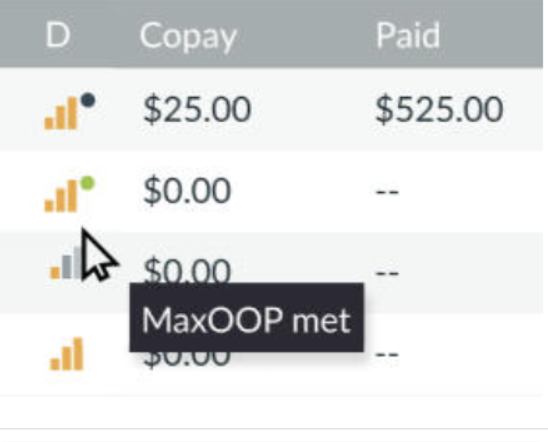
How this helps you: You’ll prevent over-collections and reduce the time spent issuing refunds. Patients won’t be prompted to pay a copay when they’ve already met their OOP max, ensuring a smoother experience.
Next Steps: This enhancement will be automatically enabled with this release.
Analytics
New data available in Patient Questionnaires & Insights
What’s new: ExternalVisitID and AccountExternalID have been added to the PQI extract to simplify matching visits and patients for PRO and screener analytics.
How this helps you: Easily access the data you need in one place to save time, enhance your reporting, and get more value from your PQI insights.
Registration
Upgrade your Phreesia registration app for PadX and ArrivalsX
What’s new: Version 25.15 of the Phreesia Registration app is now available for PadX and ArrivalsX devices.
How this helps you: Stay current with the most secure and reliable version of the Phreesia Registration app for both PadX and ArrivalsX.
Next Step:
- Own your PadX or ArrivalsX? Manually upgrade and restart your devices.
- Rent your PadX or ArrivalsX? Just restart—we’ll handle the upgrade during after-hours maintenance. Make sure devices are on Wi-Fi and charging.
- Thinking about switching to PadX? Enhance your check-in process—get yours today.
Phreesia Library
Phreesia Library
Phreesia offers a library of standardized tools and best-practice content designed to align with industry recommendations and increase completion rates. These pre-built modules can be seamlessly added to your existing intake workflows. Organizations that use these modules see a 9.5% lower drop rate, and patients complete interviews 48.8% faster compared to custom content.
We deploy new and updated content with every release.
Standardized tools
We now offer the following clinically validated patient-reported outcomes (PROs).
PHR: SUPRT-C SUITE
The SUPRT-C Suite includes nine standardized forms that support SAMHSA reporting across baseline, reassessment, and annual timepoints. Designed for children, youth, and adults, the forms capture essential data like consent, demographics, Social Drivers of Health (SDOH), and adult client-reported outcomes.
PHR: MCHAT-R Follow Up
The MCHAT-R/F workflow is now available to follow a positive initial MCHAT-R screening. Developed in collaboration with the tool’s licensor, this workflow reduces false positives and improves accuracy
PHR: Pre-Cataract Surgery- Visual Functioning Index (VF-8R)
This validated 8-question self-assessment measures visual function through daily tasks like reading, recognizing faces, using stairs, and watching TV. .