The Attachments command allows users to add other files to the form. Filler then becomes the container for these files. This and other commands can be added to your form using Action Buttons, Form Objects or Bubble Tips.
To enable encryption and signatures, you must select Attachments from the Form Menu to display the Manage Attachments dialog.
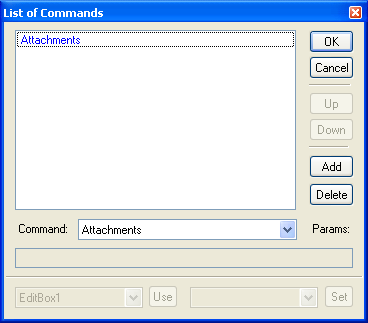
Commands can be added to Action Buttons by drawing a button using the Object Toolbar, then double-clicking to display the list of commands. Press the Add button, select "Attachments" from the dropdown list, and OK to return to your form. You can resize your button and edit the button text. Double-clicking on the button again displays the List of Commands so you can add multiple commands to a single button.
Action Button
Command:
Commands can be added to static form objects (such as text, boxes, polygons, freehand lines, ellipses, and pictures) using the HyperLink property of the object. Hyperlinks to webpages start with "http://" while commands are preceded by "cmd://".
Form Object
Command:
cmd://Attachments
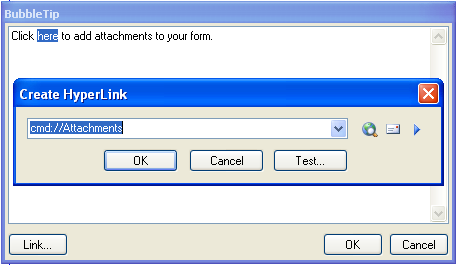
Commands can be added to Bubble Tips for any field (such as editboxes, checkboxes, radio buttons) to help guide users while they're filling out your form. Bubble Tips are actually mini-browsers and use the same HTML formatting as regular webpages. The only difference is Bubble Tips can also include commands. Select the BubbleTip property of the fillable object to display the HTML BubbleTip window. After entering your Bubble Tip, select the word or phrase and press the Link button to enter the command in the Create Hyperlink window.
BubbleTip
Command:
Commands can be added to Help Files and displayed while users complete a form. Help Files are actually web (HTML) pages embedded inside a form, or linked to web pages on the Internet. You can add commands to embedded web pages just by adding a hyperlink using the command below.
Help File
Command:
cmd://Attachments
Note: In order to enable form attachments, you must also set The Form's field properties for HasAttachments to 1 - Yes.