to indicate a file can be attached to a form.
Formatta PFF forms are capable of carrying attachments, such as word processing documents or spreadsheets. This feature is particularly useful when people filling out a form need to submit additional documentation. The form author specifies whether or not users can attach files to forms using Formatta Designer. In Formatta Filler, the Attachment Icon displays to indicate a file can be attached to a form.
Encrypting Attachments - Unlike most email packages, Formatta provides the capability to securely encrypt file attachments. Attachments can be decrypted using either the password entered by the person filling out the form, or the master password entered by the form designer.
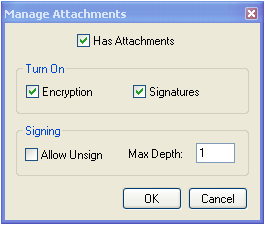
To enable encryption and signatures you must go into the Manage Attachments window, and set the respective checkboxes.
Has Attachments - specifies whether or not the form is capable of carrying attachments.
Encryption - Specifies whether or not attachments can be encrypted.
Signatures - Specifies whether or not attachments can be signed using a digital certificate, and applies to the whole set of attachments rather than individual files.
Allow Unsign - Once signed, attachments can only be unsigned (have their signature(s) cleared) if "Allow Unsign" is explicitly checked.
Max Depth - Max Depth refers to the maximum number of signatures (of different people) that can be applied to the attachments (this is multiple signature support). By default Max Depth is 1.
Note: You can only encrypt and sign attachments if the form has been locked.