 Help BrowserHelp Browser
With a Formatta Help browser, you can create interactive form Wizards - a new way to help users complete a form. Using the Help browser, you can provide step-by-step instructions while a user fills out your form. Wizards are a powerful way to both assist users and reduce your technical support calls.
Wizards are as simple as they are powerful because they're HTML web pages embedded inside the form. You can even embed web pages directly from your site and start building sophisticated, step-by-step instructions - without ever changing the layout of your existing forms.
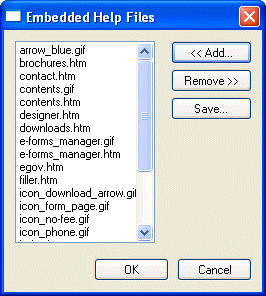
You can easily build the HTML for the Wizard pages in an HTML editor using a easy-to-use Windows graphic user interface (GUI). Create a directory folder for all the files for your HTML pages, including the graphic files for logos and navigational icons. Then, in Formatta Designer, on the Property Sheet, select the properties for the entire form. On the Field tab, click on the field labeled "HelpFiles."
When the dialog window appears, select "Add" to import the files from the folder you created. Be sure to select "All Files" from the "Files of Type" drop-down box. Highlight all the files in your folder and click "Open". On the dialog window, you will see all your files. Click "OK".
To trigger the Help browser to appear upon opening the form, select the "Help ToURL" command in the "OnOpen" field in the Field Tab on the Property Sheet. Choose the first page (index page) for the Parameters field.
Using the Help ToURL command to access the Help browser from within the form
Using the HelpSetFields command to populate the form from within the Help browser